
The fastest way to automate your daily tasks is by using AI workflows – structured, multi-step automations that handle repetitive work such as emails, research, scheduling, planning, content creation, and analysis without needing constant manual effort. By setting up workflows using the right AI tools, you can dramatically save time, reduce errors, and work at a much higher level of efficiency every day.
AI workflows are no longer reserved for technical experts. Modern platforms allow anyone – beginners, professionals, creators, or business owners – to automate daily routines with a few clicks. This guide will walk you through exactly how AI workflows work, how to set them up, and how they can replace hours of daily manual tasks.
Why Automating Daily Tasks Matters
We live in a fast-paced digital world where time is the most valuable resource. Every day, professionals and individuals juggle emails, meetings, research, and personal planning. These tasks, while essential, often consume hours that could be better spent on creative or strategic work.
Artificial Intelligence (AI) workflows offer a solution: they automate repetitive tasks, reduce human error, and create seamless systems that work in the background. Whether you’re a student, entrepreneur, or corporate professional, AI can become your invisible assistant, helping you stay organized and efficient.
Automating Email Management
1. Smart Inbox Organization
AI-powered email clients can automatically categorize messages into folders such as work, personal, promotions, and urgent. This ensures you don’t waste time scanning through irrelevant emails.
- Example tools: Gmail’s AI filters, Outlook’s Focused Inbox, Superhuman.
- Benefit: You only see what matters most, reducing inbox clutter.
2. Auto-Responses and Drafting
AI assistants can draft replies based on context. For instance, if someone asks for a meeting, the AI can suggest a polite response with available time slots.
- Example tools: ChatGPT integrations, Gmail Smart Reply.
- Benefit: Saves minutes per email, which adds up to hours weekly.
3. Scheduling Meetings
AI can sync with your calendar and propose meeting times automatically, avoiding the back-and-forth emails.
- Example tools: Calendly, Microsoft Copilot with Outlook.
- Benefit: Seamless scheduling without manual effort.
Automating Research Tasks
1. Information Gathering
Instead of manually browsing dozens of websites, AI research assistants can pull relevant data, summarize articles, and highlight key insights.
- Example tools: Copilot, Perplexity AI, Elicit.
- Benefit: Faster access to reliable information.
2. Summarization
AI can condense long reports, papers, or articles into digestible summaries, saving you from information overload.
- Example tools: Scholarcy, QuillBot Summarizer.
- Benefit: Quick understanding without reading full documents.
3. Trend Analysis
AI can track industry trends, competitor updates, or news alerts automatically.
- Example tools: Feedly AI, Google Alerts with AI filters.
- Benefit: Stay ahead without constant monitoring.
Automating Planning & Scheduling
1. Calendar Optimization
AI can analyze your schedule and suggest the best times for deep work, meetings, or breaks.
- Example tools: Motion, Reclaim AI.
- Benefit: Balanced productivity and reduced burnout.
2. Task Prioritization
AI task managers can rank your to-do list based on urgency, deadlines, and workload.
- Example tools: Todoist with AI, ClickUp AI.
- Benefit: Focus on high-impact tasks first.
3. Personal Reminders
AI can remind you of birthdays, deadlines, or even when to take breaks.
- Example tools: Copilot reminders, Google Assistant.
- Benefit: No more missed commitments.
Automating Routine Workflows
1. Document Creation
AI can generate reports, presentations, or proposals based on templates and data inputs.
- Example tools: Microsoft Copilot in Word/Excel, Jasper AI.
- Benefit: Professional documents in minutes.
2. Data Entry & Processing
AI can extract information from emails, PDFs, or spreadsheets and input them into databases automatically.
- Example tools: UiPath, Zapier with AI.
- Benefit: Eliminates manual data entry errors.
3. Social Media Management
AI can schedule posts, analyze engagement, and even generate captions.
- Example tools: Buffer AI, Hootsuite AI.
- Benefit: Consistent online presence with minimal effort.
Building Your Own AI Workflow
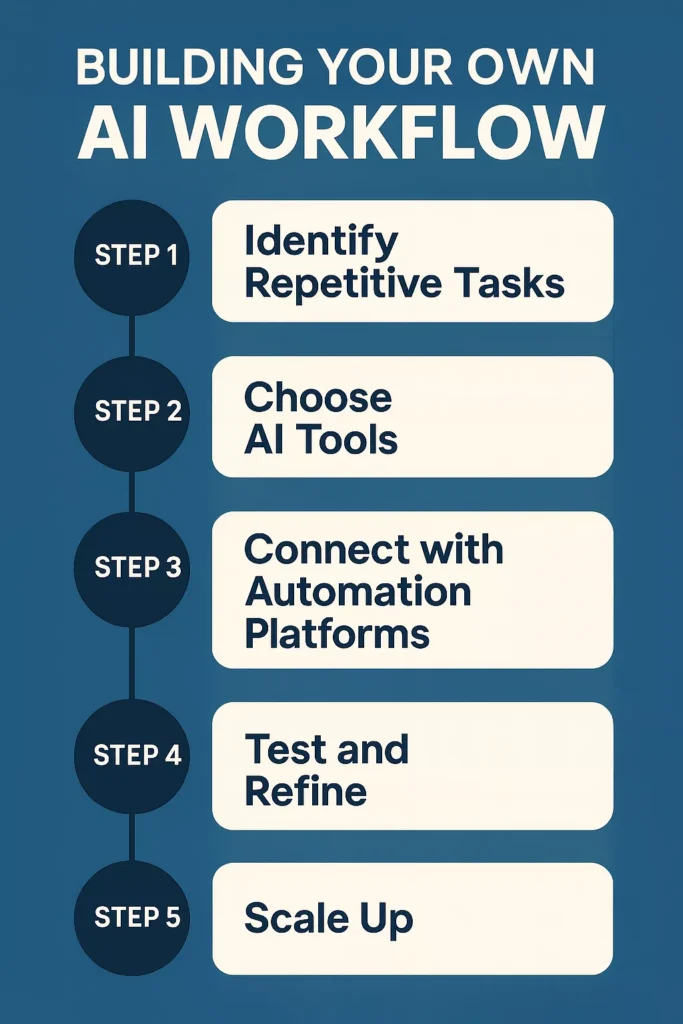
Creating your own AI workflow is like designing a personal assistant that never sleeps. It’s not just about plugging tools together—it’s about building a system that understands your routine, reduces friction, and frees up your time. Let’s break down the process step by step:
Step 1: Identify Repetitive Tasks
The first step is awareness. Take a moment to observe your daily routine and pinpoint the tasks that consume time but don’t necessarily require deep thinking. These are often repetitive, rule-based, and predictable.
- Examples of repetitive tasks:
- Sorting and replying to emails
- Scheduling meetings or reminders
- Collecting research notes or summarizing articles
- Generating weekly reports or status updates
- Copying data between spreadsheets or apps
By writing these down, you create a roadmap of what can be automated. Think of it as decluttering your digital life—once you know what slows you down, you can design AI workflows to handle them.
Step 2: Choose AI Tools
Once you know what needs automating, the next step is selecting the right AI tools. The key here is compatibility—your chosen tools should integrate smoothly with the apps you already use.
- For emails: Gmail Smart Reply, Microsoft Copilot in Outlook, Superhuman AI
- For research: Copilot, Perplexity AI, Elicit
- For planning: Motion, Reclaim AI, Todoist with AI
- For communication: Slack AI, Microsoft Teams Copilot
Tip: Don’t chase every shiny new AI app. Instead, focus on tools that complement your existing ecosystem (Google Workspace, Microsoft 365, Slack, etc.). This ensures minimal disruption and maximum efficiency.
Step 3: Connect with Automation Platforms
AI tools are powerful individually, but the real magic happens when you connect them. Platforms like Zapier, Make, or IFTTT act as bridges, allowing different apps to talk to each other and trigger actions automatically.
- Example workflow:
- A new email arrives → AI summarizes the content → Summary is sent to your task planner → Planner schedules a follow-up reminder.
This chain of actions transforms a manual process into a seamless automation. You don’t even have to open your inbox—your AI workflow handles it for you.
Step 4: Test and Refine
No workflow is perfect on the first try. Testing ensures that your automation runs smoothly and doesn’t create errors or duplicate tasks.
- How to refine:
- Run the workflow for a week and observe results.
- Check if emails are categorized correctly.
- Ensure tasks are scheduled at the right times.
- Adjust filters, triggers, or AI prompts for accuracy.
Think of this stage as training your digital assistant. The more you refine, the smarter and more reliable your workflow becomes.
Step 5: Scale Up
Once your initial workflow is stable, it’s time to expand. Start automating more complex areas of your professional and personal life.
- Advanced automation ideas:
- Finance tracking: AI categorizes expenses and generates monthly reports.
- Customer support: AI drafts responses to FAQs and routes tickets to the right team.
- Content creation: AI generates blog outlines, social media captions, or newsletters.
- Project management: AI updates progress reports and sends reminders to teammates.
Scaling up doesn’t mean automating everything at once. Add one new workflow at a time, ensuring each is reliable before moving on. Over time, you’ll build a robust AI ecosystem that handles most of your routine tasks.
Real-Life Examples of AI Workflows
AI workflows aren’t just theoretical—they’re already transforming how people work and live. Here are some practical examples across different roles and industries:
a. Entrepreneur / Small Business Owner
Running a business often means juggling emails, client communication, and finances. AI workflows can simplify this:
- Email Automation: Incoming client inquiries are automatically categorized, summarized, and added to a CRM system.
- Scheduling: AI syncs calendars and proposes meeting times without back-and-forth emails.
- Finance Tracking: AI tools generate monthly expense reports and highlight unusual spending patterns.
Workflow Example: Client email → AI summarizes inquiry → Task added to CRM → Calendar schedules follow-up → Finance tool logs invoice.
b. Student / Researcher
Students and researchers deal with information overload. AI workflows help them stay organized:
- Research Summarization: AI condenses long academic papers into key points.
- Study Planning: AI creates personalized study schedules based on deadlines.
- Note Management: AI organizes lecture notes into searchable summaries.
Workflow Example: Upload research paper → AI summarizes → Notes stored in knowledge base → Planner schedules study sessions.
c. Corporate Professional
In a corporate environment, efficiency is everything. AI workflows streamline communication and reporting:
- Inbox Management: AI filters emails into urgent, informational, or promotional categories.
- Meeting Prep: AI generates agendas and pulls relevant documents before meetings.
- Reporting: AI automatically compiles weekly performance reports from spreadsheets.
Workflow Example: Weekly data → AI generates report → Report shared with team → AI schedules review meeting.
d. Content Creator / Marketer
Creators need consistency and speed. AI workflows help manage content pipelines:
- Social Media Automation: AI drafts captions, schedules posts, and analyzes engagement.
- Content Research: AI scans trending topics and suggests blog ideas.
- Design Support: AI generates graphics or templates for campaigns.
Workflow Example: Trending topic → AI drafts blog outline → AI designs social media post → Scheduler publishes content → Analytics tool tracks performance.
e. Healthcare Professional
AI workflows can support doctors, nurses, and administrators by reducing paperwork:
- Appointment Scheduling: AI manages patient bookings and reminders.
- Medical Records: AI extracts key details from patient files for quick review.
- Follow-Up Care: AI sends automated check-in messages to patients post-treatment.
Workflow Example: Patient books appointment → AI confirms schedule → Records summarized for doctor → AI sends follow-up reminder.
f. Personal Life / Everyday Use
AI workflows aren’t just for work—they can simplify daily routines:
- Smart Home Automation: AI adjusts lighting, temperature, and appliances based on your schedule.
- Personal Finance: AI categorizes expenses and alerts you to savings opportunities.
- Health & Wellness: AI reminds you to hydrate, exercise, or take breaks.
Workflow Example: Morning routine → AI adjusts thermostat → AI reminds of workout → Finance app logs daily spending.
Benefits of AI Workflows
AI workflows aren’t just about convenience—they’re about transforming the way you work and live. Here’s how they make a real difference:
- Time Savings
Imagine reclaiming hours every week that were once lost to repetitive tasks. AI workflows handle the small but time-consuming jobs—like sorting emails, scheduling meetings, or compiling reports—so you can focus on the bigger picture. Over time, these saved minutes add up to days of productivity gained.
- Reduced Stress
No more juggling dozens of apps or worrying about missed deadlines. By automating routine processes, AI reduces the mental load of constant multitasking. You’ll feel more in control, with fewer distractions pulling you away from important work.
- Accuracy
Human error is natural, especially when dealing with large amounts of data or repetitive tasks. AI workflows minimize mistakes by following consistent rules and patterns. Whether it’s entering data, sending reminders, or generating reports, automation ensures precision every time.
- Scalability
As your workload grows, AI workflows grow with you. Whether you’re managing a small project or scaling up to enterprise-level operations, automation adapts to handle increasing complexity without adding extra stress. It’s like having a system that evolves alongside your needs.
- Focus
The greatest benefit of all: freedom to focus on what truly matters. With routine tasks delegated to AI, you gain more energy for creative thinking, strategic planning, and meaningful work. Instead of being buried in busywork, you can channel your efforts into innovation and growth.
Future of AI in Daily Automation
AI workflows are evolving rapidly. Soon, they’ll not only automate tasks but also predict needs before you ask. Imagine an AI that notices your workload rising and automatically reschedules meetings or prepares reports proactively.
The future isn’t just about automation – it’s about intelligent delegation, where AI becomes a trusted partner in your daily life.
Conclusion
Automating daily tasks using AI workflows is no longer a luxury—it’s a necessity for anyone who values time and efficiency. From managing emails to conducting research, planning schedules, and handling routine work, AI can take over repetitive tasks and free you to focus on creativity, strategy, and personal growth.
The key is to start small, experiment with tools, and gradually build workflows that fit your lifestyle. Once you embrace AI automation, you’ll wonder how you ever managed without it.
FAQs
1. How do I start automating daily tasks without getting overwhelmed?
Begin with one high-friction, repetitive task—like inbox triage or meeting scheduling—and solve just that. Choose AI tools that fit your existing stack (e.g., Gmail/Outlook for email, Google Calendar/Microsoft 365 for scheduling), then connect them with a simple automation (e.g., new email → AI summary → add to task list). Run it for a week, tweak filters or prompts, and only then add a second workflow. Small wins compound faster than complex setups.
2. Which tasks deliver the biggest impact when automated?
Focus on tasks with high frequency and low judgment: email sorting and quick replies, calendar coordination, research summarization, report generation, and data copy/paste between apps. These typically reclaim the most time and reduce context-switching. If you’re client-facing, add CRM updates and follow-ups; if you’re research-heavy, add article summarization and notes organization; if you’re content-focused, automate outlines, captions, and publishing schedules.
3. What if my tools don’t integrate well?
Use automation hubs that bridge gaps. If two apps don’t natively connect, route events via an intermediary (e.g., trigger from email → send to notes → create task). When an integration is missing, export to a standard format (CSV, Markdown, PDF) and let another tool ingest it. As a fallback, rely on email-to-task or webhook-based flows—those work with almost everything and keep your system flexible.
4. How do I prevent errors and maintain accuracy?
Test with a small dataset first. Add guardrails: filters (only process messages with certain keywords), approvals (require confirmation before sending), and logs (track what ran and when). Keep prompts explicit—define tone, output format, and exceptions. Review automation outputs daily for a week, then weekly thereafter. If you notice drift, tighten rules or split one broad workflow into two precise ones.
5. How can I scale AI workflows as my needs grow?
Document each workflow (trigger, steps, outputs, failure handling) and standardize naming across tools. Move from single-purpose automations to modular chains (e.g., email → summary → task → scheduled follow-up → report). Introduce roles: a “triage” workflow for intake, a “processing” workflow for transformation, and a “publishing” workflow for outputs. As complexity rises, add alerts for failures and a dashboard view of throughput so you can spot bottlenecks early.