
AI workflow builders are powerful tools that allow anyone—without coding skills—to automate complex, multi-step tasks in minutes. Instead of writing scripts or hiring developers, users can visually design workflows using drag-and-drop interfaces, AI-driven suggestions, and pre-built integrations. These tools simplify automation, save time, and make advanced technology accessible to professionals, entrepreneurs, and everyday users.
Why AI Workflow Builders Matter
Automation has always been a game-changer in business and personal productivity. Traditionally, however, building workflows required programming knowledge, APIs, and technical expertise. AI workflow builders change this landscape by offering no-code automation platforms that combine artificial intelligence with intuitive design.
They empower users to:
- Connect multiple apps and services seamlessly.
- Automate repetitive tasks like data entry, reporting, or notifications.
- Build complex, multi-step processes without writing a single line of code.
- Scale productivity across industries—from marketing to healthcare.
What Are AI Workflow Builders?
AI workflow builders are no-code automation platforms enhanced with artificial intelligence. They allow users to create workflows by visually mapping out steps, triggers, and actions.
Key Features
- Drag-and-drop interfaces for easy workflow design.
- AI-powered suggestions to recommend next steps.
- Pre-built templates for common tasks like email automation, lead generation, or social media posting.
- Integration libraries connecting hundreds of apps (Google Workspace, Slack, Salesforce, etc.).
- Conditional logic for branching workflows.
How They Work: Step-by-Step
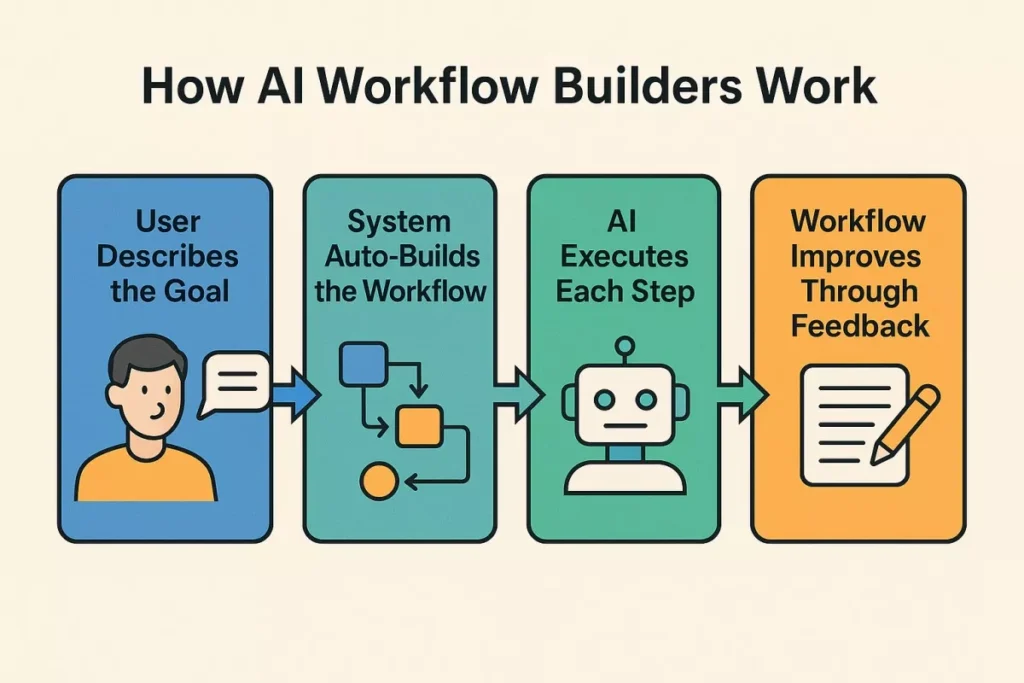
- Choose a Trigger
- Example: A new email arrives in Gmail.
- Define Actions
- Example: Extract data, update a spreadsheet, send a Slack notification.
- Add AI Enhancements
- Example: Summarize the email using AI, categorize it, and auto-respond.
- Run & Monitor
- The workflow executes automatically, with dashboards showing performance.
Benefits of AI Workflow Builders
AI workflow builders offer a powerful set of advantages that go far beyond simple automation. They combine artificial intelligence, no-code technology, and deep app integrations to help individuals and businesses streamline processes, improve productivity, and scale operations with minimal effort. These tools eliminate repetitive digital tasks, enhance accuracy, and give teams more time for high-value strategic work. Below is a detailed breakdown of the major benefits:
1. No Coding Skills Required — Automation for Everyone
One of the most transformative benefits is accessibility.
Traditional automation tools required programming knowledge, but AI workflow builders remove that barrier entirely. Anyone—marketers, small business owners, HR professionals, students, or freelancers—can create powerful workflows using natural language prompts or drag-and-drop interfaces.
What this means:
- No need to hire developers
- Lower cost of automation
- Shorter learning curve
- Faster implementation
This democratizes automation and allows every team member to improve productivity.
2. Saves Hours of Manual Work Every Week
Many tasks repeat daily—checking emails, creating reports, updating spreadsheets, responding to customers, and organizing files. AI workflow builders automate these steps, saving enormous amounts of time.
Examples of time saved:
- Automated content creation instead of writing manually
- Auto-summarizing emails instead of reading long threads
- Generating reports instantly instead of compiling data
- Updating CRMs automatically instead of manual entry
This frees up hours each week, allowing people to focus on creative, analytical, or strategic work.
3. Reduces Human Error and Ensures Consistency
Manual tasks often lead to mistakes—typos, missing data, miscommunication, or skipped steps. AI workflow builders are precise and consistent.
This benefit helps with:
- Accurate data entry
- Standardized reports
- Consistent content tone
- Error-free document processing
- Reliable execution of repeated tasks
Organizations benefit from smoother operations and better reliability.
4. Enhances Team Productivity and Efficiency
Because AI handles repetitive or complex tasks, teams work faster and more effectively. Workflows run in the background 24/7, even when employees are offline.
This leads to:
- Shorter project timelines
- Faster task completion
- Less burnout from repetitive tasks
- Improved cross-team coordination
Teams can shift their focus toward innovation and problem-solving instead of routine work.
5. Makes Scaling Easy Without Extra Workforce
Hiring more people to handle growing workloads is costly. AI workflow builders scale effortlessly with business needs.
They allow you to:
- Handle more customers
- Manage larger data volumes
- Run more campaigns
- Monitor more systems
- Process more documents
All without extra salaries or onboarding, making them cost-effective for growing companies.
6. Lowers Operational Costs Significantly
By automating repetitive tasks, businesses reduce the need for manual labor in many areas.
Cost savings occur in:
- Data entry
- Customer support
- Marketing operations
- Finance processes
- Reporting
- Administrative tasks
AI tools act like virtual employees working around the clock at a fraction of the cost.
7. Improves Decision-Making With AI Insights
AI workflow builders don’t just automate—they analyze.
They can:
- Interpret data
- Generate summaries
- Highlight trends
- Spot patterns
- Make recommendations
These insights help leaders make smarter, faster decisions backed by real-time information.
8. Ensures Smooth, End-to-End Processes
AI workflow builders connect multiple tools—email, spreadsheets, CRMs, cloud storage, chat apps, and more—to create seamless end-to-end systems.
This makes complex tasks feel effortless:
- A customer email triggers an AI summary
- That summary becomes a ticket
- Details flow into the CRM
- A reply is auto-drafted
- A reminder is scheduled
All without human input.
9. Increases Output Quality and Creativity
AI enhances creativity instead of replacing it. Workflow builders produce high-quality drafts, ideas, outlines, and structured content that humans can refine.
This results in:
- Better blog posts
- Faster content marketing
- Higher-quality client communications
- More polished reports
Teams can produce more while maintaining quality.
10. Supports Personalized Automation for Every User
AI workflow builders can adapt to individual workflows and personal work styles. Each user can create custom automations tailored to their needs.
Examples:
- Daily summaries
- Personalized task lists
- Email filters
- Auto-generated notes
- Study aids and research workflows
This makes AI automation more practical for daily life, not just business.
11. Enhances Collaboration Across Departments
Because workflows integrate multiple apps, teams can communicate more smoothly and share information automatically.
This eliminates:
- Manual handoffs
- Miscommunication
- Delays due to human dependency
Departments such as marketing, sales, HR, and finance stay aligned with minimal manual coordination.
12. Provides Transparency Through Logs and Tracking
AI workflow builders usually include dashboards that display:
- Workflow runs
- Errors
- Output history
- Execution time
- Trigger events
This transparency helps teams troubleshoot, audit, and optimize processes.
13. Works 24/7 Without Breaks
Unlike humans, AI workflows don’t get tired, distracted, or overwhelmed. They work continuously, providing uninterrupted productivity around the clock.
Useful for:
- Global teams
- E-commerce stores
- Customer support
- Monitoring systems
- Continuous data collection
This reliability makes operations smoother and more predictable.
14. Creates Space for Strategy, Innovation, and Growth
By taking over routine work, AI workflow builders free teams to focus on:
- Creative ideas
- Customer relationships
- Experimentation
- Business strategy
- Innovation
Instead of being trapped in repetitive tasks, people move into higher-value roles.
Popular AI Workflow Builder Tools
Here are some leading platforms:
| Tool | Key Strength | Use Case Example |
|---|---|---|
| Zapier AI | Large app ecosystem | Automating marketing campaigns |
| Make (Integromat) | Visual workflow design | Complex multi-step business processes |
| n8n | Open-source flexibility | Custom enterprise workflows |
| Microsoft Power Automate | Enterprise-grade | Automating Office 365 tasks |
| Airplane.dev | Developer-focused | Internal tool automation |
Real-World Applications
Business
- Automating lead capture and CRM updates.
- Generating reports from multiple data sources.
Marketing
- Scheduling social media posts.
- Personalizing customer emails with AI.
Healthcare
- Automating patient intake forms.
- Streamlining appointment reminders.
Education
- Auto-grading assignments.
- Managing student records.
Personal Productivity
- Automating bill reminders.
- Organizing digital files.
AI Enhancements in Workflow Builders
AI adds intelligence to automation:
- Natural Language Processing (NLP): Understands text and voice commands.
- Machine Learning: Predicts next steps based on past behavior.
- Generative AI: Creates content (emails, reports, summaries).
- Decision Automation: Chooses optimal paths in workflows.
Challenges and Limitations
- Data Privacy Concerns: Sensitive data must be protected.
- Integration Gaps: Not all apps are supported.
- Learning Curve: While no-code, complex workflows still require planning.
- Cost: Advanced features may require premium subscriptions.
Future of AI Workflow Builders
The future is promising:
- Voice-driven workflow creation (e.g., “Automate my invoices”).
- Deeper AI personalization (workflows that adapt to user habits).
- Industry-specific templates (healthcare, finance, education).
- Cross-platform universality (one workflow across all devices).
Best Practices for Using AI Workflow Builders
- Start Small: Automate simple tasks first.
- Use Templates: Leverage pre-built workflows.
- Test Thoroughly: Ensure accuracy before scaling.
- Monitor Performance: Use dashboards to track efficiency.
- Stay Updated: Explore new AI features regularly.
Step-by-Step Example Workflow
Scenario: Automating customer support emails.
- Trigger: Customer email arrives.
- AI Action: Summarize the email.
- Decision: Categorize as billing, technical, or general inquiry.
- Action: Route to correct department.
- Follow-up: Send automated acknowledgment email.
Result: Faster response times, reduced workload, improved customer satisfaction.
Impact Across Industries
- Finance: Automating compliance checks.
- Retail: Managing inventory updates.
- Logistics: Tracking shipments in real-time.
- Government: Streamlining citizen services.
Conclusion
AI workflow builders represent one of the most significant transformations in digital work. By combining natural language understanding, intelligent automation, sophisticated reasoning, and deep integration capabilities, these tools make automation accessible to everyone.
Whether you’re a business owner, marketer, analyst, HR manager, or everyday user, AI workflow builders can drastically reduce manual effort, improve accuracy, scale operations, and free up time for creative and strategic work. As these tools continue evolving, they will not only reshape workplace productivity but redefine how entire industries operate. The future of work is automated, intelligent, and built through simple instructions—and AI workflow builders are leading the way.