
AI spreadsheet engines are tools designed to interpret your natural-language instructions—such as “calculate total revenue for Q2 and show monthly growth” or “make a pie chart of expense categories”—and automatically build the required formulas, functions and visualizations in a spreadsheet. These tools dramatically reduce the time, skill and error-risk involved in traditional spreadsheet workflows.
AI Spreadsheet Engines: Why This Matters Now
Spreadsheets have long been foundational in business, education, research and personal data-management. But they’ve also posed a barrier: you usually need to know functions (SUM, VLOOKUP, INDEX/MATCH, etc.), chart-building steps, cell references, debugging, and so on. This creates friction for non-technical users and slows down analysts.
With the rise of AI, we now have spreadsheet engines that enable plain-English (or other language) commands to trigger formulas, charts and even full-blown dashboards. That means:
- People without deep spreadsheet skills can still analyse data.
- Routine tasks (cleaning data, building charts) become faster.
- Fewer formula errors or mis-referencing mistakes.
- Productivity gains: because you spend less time wrestling with syntax.
To put this in perspective: an industry article pointed out that up to 1.5 billion users worldwide rely on Microsoft Excel, yet emerging AI-driven tools are now reshaping how those users work.
What Are AI Spreadsheet Engines?
AI spreadsheet engines are intelligent software systems that allow you to interact with spreadsheets using natural language instead of formulas. Instead of remembering complicated functions or manually selecting ranges, you simply type (or speak) what you want—such as “calculate total sales for 2024” or “create a bar chart of monthly revenue”—and the AI instantly generates the correct formula or visualization for you.
At their core, these engines combine natural language processing, machine learning, and contextual understanding of your sheet’s data structure. This lets them interpret your instructions, identify relevant columns, detect patterns, and execute tasks automatically. For beginners, this removes the fear of formulas. For experts, it accelerates complex workflows.
Key Capabilities of AI Spreadsheet Engines
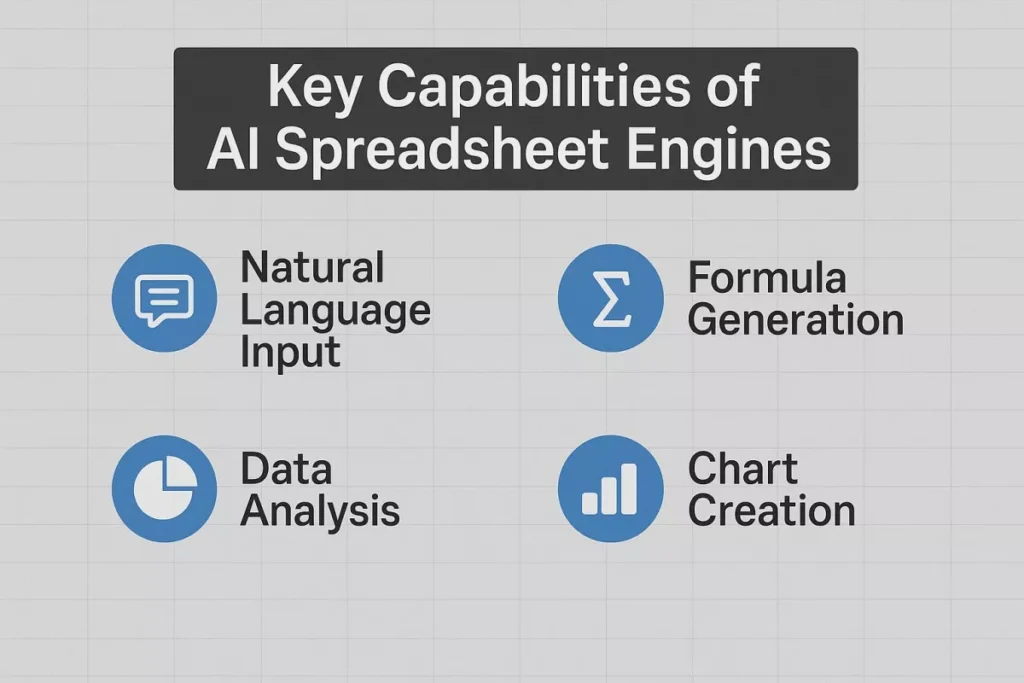
AI spreadsheet engines typically include features such as:
- Natural Language to Formula Conversion
Convert plain English commands into accurate spreadsheet formulas like SUM, AVERAGE, IF, VLOOKUP, INDEX/MATCH, COUNTIFS, and more. - Automatic Chart & Visualization Creation
Ask for a “weekly performance line chart” or “category-wise expense pie chart,” and the AI builds it instantly. - Data Cleaning & Preparation
Identify and fix duplicates, inconsistent dates, messy formats, missing entries, or out-of-range values automatically. - Formula Debugging & Error Correction
Explain why a formula is broken and rewrite a corrected version. - Insight Generation
Detect trends, anomalies, outliers, or correlations—helping users understand data more deeply. - Multi-Step Automation
Perform a series of tasks (clean data → apply formulas → build charts → summarise insights) using a single natural language prompt.
How These Engines Work – A Closer Look
Natural Language Processing (NLP)
The engine receives a command like “Show me highest sales day” and uses NLP to interpret it. It identifies actionable items: “highest”, “sales”, “day”.
Context & Data Structure Awareness
The tool looks at your sheet: what columns you have (“Sales”, “Date”), what type of data (numbers, dates), where tables reside. It uses that context to build an appropriate formula or chart.
Formula / Chart Generation
The engine picks the correct functions: e.g., =MAX(SalesColumn) or =SORT(SalesColumn,-1) depending on use-case. For charts, it selects data range, chart type, adds labels.
Data Cleaning / Preparation
It may detect: missing values, inconsistent date formats, duplicate rows. It either offers a command (“Remove duplicates”) or automatically applies fixes.
Insight & Automation Layers
Some engines go further: they identify trends, anomalies, and suggest next actions (“Your sales dipped in May – create a trend chart”). They can also chain steps: data import → clean → calculate → visualise → export.
Recent Research
An academic framework called “SheetMind” demonstrated an 80 % success rate for single-step instructions and ~70 % for multi-step instructions in spreadsheet automation via LLMs.
This underlines that the technology is mature and capable of meaningful automation.
Key Features of AI Spreadsheet Engines
Let’s go feature by feature, discuss what they deliver and why that matters.
1. Natural Language → Formula Conversion
What it does: You type or speak something like:
- “Sum total cost in column C for Q1”
- “Count unique customers in 2024”
The AI generates the exact formula.
Why it matters: For many users, formula syntax is a hurdle. With AI, you can skip that learning curve.
Benefits:
- Rapid generation of formulas without manual editing.
- Less risk of syntax errors, referencing issues.
- Empowerment of non-experts.
2. Automatic Chart / Visualisation Generation
What it does: You say:
- “Create a bar chart of monthly revenue”
- “Show a pie chart of expenditure by department”
The AI picks data, chooses the appropriate chart type, formats labels.
Why it matters: Charts often require selecting ranges, choosing type, formatting—this can be time-consuming. AI simplifies it.
Benefits:
- Faster visualisation of key metrics.
- Enables decision-makers to see insights without waiting.
- Consistent visual output that meets basic design standards.
3. Data Cleaning & Correction
What it does: The engine spots issues like:
- “There are duplicates in column ‘Email’”
- “Dates are inconsistent (dd/mm/yyyy vs mm/dd/yyyy)”
It offers to fix or does so automatically.
Why it matters: Dirty data is a major time-sink. Fixing it manually consumes hours. AI accelerates this vital step.
Benefits:
- Improves data quality (fewer errors downstream).
- Frees users to focus on insights not cleaning.
- Enables higher trust in the results.
4. Formula Debugging & Guidance
What it does: You get an error like #REF! or #DIV/0!. The AI tells you what’s wrong and offers a fix, e.g. adjusting cell ranges or conditions.
Why it matters: Debugging formulas is a common frustration for many users, especially non-experts.
Benefits:
- Reduced time lost in error-fixing.
- Improved accuracy and reliability of worksheets.
- Better learning experience—users can learn by seeing corrections.
5. Insight Generation & Recommendations
What it does: AI reviews your data and says things like:
- “Sales dropped 12 % in June vs May”
- “Top 10 % of customers account for 60 % of revenue”
Why it matters: Many users have data but lack time or skill to draw insights. AI acts as an assistant.
Benefits:
- Enables faster decision-making.
- Makes data-driven insights accessible across teams.
- Helps detect opportunities or risks earlier.
6. Workflow Automation & Integration
What it does: You say: “Import latest CSV, clean it, compute growth rates, chart results, and email to stakeholder”. The engine sets up the multi-step workflow.
Why it matters: Many business processes are repetitive and manual; this automation saves time and standardises operations.
Benefits:
- Standardised and repeatable processes.
- Fewer human errors in workflows.
- Scalability—teams can handle more with same resources.
Benefits of AI Spreadsheet Engines
Let’s dig into why this technology is significant and what tangible benefits users and organisations can expect.
Benefit 1: No or Minimal Technical/Formula Skill Required
- With AI, non-technical users can build complex analyses using plain language.
- Teams with diverse backgrounds (marketing, HR, operations) can engage with data without heavy training.
- This lowering of the barrier means data becomes accessible to more people, not just analysts.
Benefit 2: Saves Hours of Manual Work
- Traditional workflows: cleaning data → constructing formulas → building charts → reviewing → fixing.
- AI compresses many of these steps into minutes.
- For example: A recent article noted that AI tools for sheet-analysis in 2025 are rapidly growing, enabling users to “analyze your data 10x faster with AI”.
- In many organisations, time savings translate directly into reduced cost and faster response.
Benefit 3: Fewer Errors, Higher Accuracy
- Studies show spreadsheets often contain errors: one academic study found 0.8-1.8% of formula cells had errors.
- When formulas are auto-generated and validated by AI, error risk can drop significantly.
- Better data and fewer mistakes means higher confidence in decision-making.
Benefit 4: Data Becomes More Accessible Across Teams
- Rather than having one “Excel guru”, teams can self-serve.
- For example, a customer of Gemini in Google Sheets said: “Now that everyone has access to Gemini, the entire team is empowered to expand their skillset and glean insights from their own analyses.”
- This democratisation of data fosters collaboration, faster iteration, and better alignment.
Benefit 5: Productivity Boost Across Departments
- While finance and analytics teams obviously benefit, marketing, HR, operations and even student/research workflows benefit.
- For instance:
- Marketing can quickly build campaign dashboards.
- HR can track employee metrics without advanced formulas.
- Operations can automate supply-chain spreadsheets.
- Given the recent productivity concerns globally (for example, U.S. labour productivity rose 2.4 % in Q2 2025 after previous declines), tools that allow faster output with less input are very timely.
Real-World Use Cases of AI Spreadsheet Engines
AI spreadsheet engines are transforming how businesses, teams, and individuals manage data. Instead of relying on complex formulas or manual processes, users can simply describe what they want—and the AI handles everything from calculations to visualization. Below are the most impactful real-world use cases, explained through clear paragraphs and detailed, long-form bullet points.
1. Business Analysts
Business analysts often work under pressure to deliver fast, accurate insights. AI spreadsheet engines streamline their entire workflow by removing manual complexity.
- Build complete dashboards from natural language instructions—including KPIs, pivot tables, trend charts, and summary metrics—helping analysts respond to stakeholder needs in minutes rather than hours.
- Run scenario modeling without writing formulas, such as forecasting revenue, simulating pricing changes, or projecting demand, enabling quicker what-if analysis.
- Automate repetitive reporting tasks, such as weekly sales summaries or monthly performance updates, freeing time for strategic analysis instead of formatting sheets.
2. Finance Teams
Finance professionals work heavily with formulas, reconciliations, and structured reporting. AI engines dramatically reduce manual labor and risk of mistakes.
- Automate financial calculations like ROI, EBITDA, NPV, month-end variance, or cash-flow projections using simple prompts instead of nested formulas.
- Clean messy exports from accounting or ERP systems, including fixing mismatched dates, removing duplicates, and standardizing currency formats with one command.
- Reduce error rates in critical spreadsheets, since AI checks formula logic, corrects reference issues, and flags inconsistent data before it reaches leadership.
3. Marketing Teams
Marketing teams depend on data-driven decisions but often lack advanced spreadsheet skills. AI makes analysis accessible to everyone.
- Create campaign performance dashboards instantly, combining data from Google Ads, Facebook, analytics platforms, and CSV exports—all summarized with natural-language prompts.
- Identify high-performing and underperforming campaigns, with AI automatically analyzing trends, conversion patterns, CPC changes, or ROI shifts.
- Visualize long-term marketing trends, producing heat maps, comparison charts, and segmentation reports that normally take hours to build manually.
4. E-Commerce & Retail
E-commerce businesses handle massive datasets across sales, inventory, pricing, and customer behavior. AI engines help turn this raw data into actionable insights.
- Analyze product sales in seconds, identifying top performers, seasonal demand patterns, customer purchase frequency, and SKU-level revenue without writing a single formula.
- Track inventory trends and prevent stockouts, with AI generating alerts, forecasting future needs, and visualizing stock movement automatically.
- Segment customers by behavior or spending, using clustering-like prompts that summarize high-value buyers, frequent purchasers, or churn-risk groups.
5. HR & People Operations
HR teams often rely on spreadsheets for workforce analysis, but formulas and charts can slow down operations. AI engines make these tasks effortless.
- Monitor employee performance and attendance trends, producing visual summaries of absenteeism, turnover, or department performance within seconds.
- Create compensation analysis sheets, comparing salaries across levels, roles, and regions—helping HR maintain fairness and transparency.
- Track diversity, hiring funnels, and workforce demographics, turning raw HRIS exports into clean, insightful charts with one prompt.
6. Operations & Supply Chain
Operations teams rely heavily on accuracy and speed. AI spreadsheet engines reduce errors and accelerate reporting.
- Automate supply chain dashboards, tracking delivery timelines, vendor performance, delay patterns, and logistic costs without manual work.
- Forecast demand and capacity, using AI-generated formulas to predict future inventory needs or production requirements.
- Clean and merge data from multiple systems, helping teams work with procurement, warehouse, and production data in a standardized way.
7. Students, Teachers & Researchers
Education and research often involve complex datasets and statistical calculations. AI engines simplify the entire process.
- Run statistical analysis such as correlation, regression, t-tests, or distribution summaries through natural-language prompts.
- Clean survey results and research datasets, fixing missing values or formatting inconsistencies instantly.
- Create visualizations for reports, such as scatter plots, histograms, comparison charts, and time-series graphs—no manual chart setup required.
8. Small Businesses & Entrepreneurs
Small businesses often lack data analysts, making AI spreadsheet engines especially helpful.
- Manage expenses and budgeting, with AI converting raw bank data into insights on spending trends, cost reduction, and cash flow.
- Track sales and customer activity, automatically generating weekly or monthly performance reports.
- Prep investor or client presentations, with AI converting spreadsheet data into clean, ready-to-share charts and summaries.
9. Consultants & Freelancers
Consultants need fast turnaround and polished output for clients. AI tools become their silent partner.
- Build custom dashboards for clients, quickly turning vague requirements into functional spreadsheet reports.
- Analyze large client datasets, interpreting trends, risks, and opportunities without time-consuming manual formulas.
- Generate visual reports, enabling consultants to provide insights faster and at higher quality.
Why These Engines Are Gaining Traction
Several forces are accelerating adoption:
- Data volume & complexity: Organisations produce far more data than before and need ways to handle it quickly.
- Skill shortage: Many teams lack deep Excel/formula expertise; AI fills the gap.
- Workflow speed demands: Users expect faster turn-around, less manual delay.
- AI maturity: Research shows tools like SheetMind deliver high success rates (70-80 %) for spreadsheet automation.
- Market movement: An article in FM Magazine states that AI-enabled spreadsheet tools are poised to challenge Excel’s dominance.
- New features from major platforms: Gemini in Google Sheets now provides formula generation, chart building and data cleaning via prompts.
- Efficiency & cost pressures: With productivity challenges like the ones faced in the UK and U.S., tools that boost output per hour become strategic.
Challenges & Considerations
No tool is perfect; organisations should be aware of a few caveats:
- Data accuracy & context: AI may misinterpret vague instructions or messy data; human review remains important.
- Prompt quality matters: Clear, specific instructions produce better outcomes.
- Security/privacy: Especially in finance or HR, data must stay secure and compliant.
- Change management: Teams accustomed to traditional spreadsheets might resist or under-utilise the new tools.
- Skill evolution: Users still need to understand data logic—AI doesn’t eliminate the need for analytical thinking.
Future of AI in Spreadsheets
The future of AI in spreadsheets will turn traditional sheets into intelligent, self-operating data partners. Instead of writing formulas or cleaning data, users will simply describe what they need, and AI will handle everything automatically. Spreadsheets will become conversational, voice-enabled, and connected to real-time data sources, updating charts and calculations instantly. AI will also provide proactive insights—spotting trends, risks, and opportunities before users even look for them. With automated workflows and domain-specific intelligence, spreadsheets will shift from being manual tools to dynamic decision-support systems that help teams work faster, smarter, and with far fewer errors.
Conclusion: Embrace the Smarter Spreadsheet Workflow
AI spreadsheet engines are not just incremental improvements — they represent a paradigm shift in how we work with data. By converting natural language into formulas and charts, these tools open up data analysis to more people, speed up workflows, and reduce errors.
Whether you’re a business analyst, marketer, operations lead, HR professional or student, the benefits include:
- Reduced manual work
- Faster insights
- Better data quality
- More inclusive access to analytics
The world is moving faster and decision-timing matters more than ever. As data volume grows and teams become leaner, tools that help you do more with less effort will gain significance.
If you’re ready to step into the future of spreadsheet work, consider experimenting with an AI spreadsheet engine and start telling your data what you want — not your data telling you what to do.
FAQs
1. What exactly can AI spreadsheet engines do?
AI spreadsheet engines can convert natural language instructions into formulas, build charts, clean data, summarize insights, and automate multi-step tasks. They help users work faster by eliminating the need to manually write functions or format sheets.
2. Do I need advanced Excel or Sheets skills to use these AI tools?
No. AI spreadsheet engines are designed for all skill levels. You simply describe what you want—such as “sum monthly revenue” or “create a bar chart”—and the AI handles the technical steps automatically.
3. Are AI-generated formulas accurate and reliable?
Yes. Most engines use advanced language models trained on thousands of formula patterns, reducing common errors like misreferenced cells or incorrect syntax. Users can still review, edit, or refine the output for extra accuracy.
4. Can AI spreadsheet engines work with large or messy datasets?
Absolutely. These tools can clean duplicates, fix formatting issues, identify inconsistencies, and reorganize large datasets quickly. They are especially helpful when working with CSV exports or mixed data from multiple sources.
5. Will AI replace traditional spreadsheet skills entirely?
Not completely. AI makes spreadsheets easier and faster, but understanding data logic still matters. Instead of replacing skills, AI enhances them—allowing users to focus on analysis and strategy rather than manual formula work.