
AI UI Generators are advanced tools that instantly turn plain text descriptions into complete, ready-to-use user interfaces—without coding, complex design tools, or manual layout work. Simply type what interface you want, and the AI automatically creates screens, components, layouts, and even design systems. This technology is transforming UI/UX design by making interface creation faster, more accessible, and far more efficient.
A New Era of Text-to-Interface Design
For decades, designing a user interface required a combination of skills—visual design, UX logic, front-end development, and prototyping. Whether building an app, dashboard, or website, the process involved hours of brainstorming, wireframing, component creation, and endless iterations.
AI UI Generators change this entire workflow.
These tools allow anyone—designers, developers, product managers, or complete beginners—to describe an interface in natural language:
- “Create a login screen with two fields and a CTA button.”
- “Build a dashboard with charts, KPIs, and a user profile section.”
- “Generate a mobile app layout for a food delivery platform.”
The AI then produces a fully structured UI that can be exported, refined, or integrated into a development workflow.
This article explores how AI UI generators work, their benefits, top use cases, key technologies, limitations, future potential, and the evolving impact on design and software development.
What Are AI UI Generators?
AI UI Generators are tools powered by large language models (LLMs), computer vision, and layout optimization algorithms that convert text-based instructions into complete screen designs or interface components.
In other words:
They are “text-to-UI” engines that automate the entire design process from idea to prototype.
What They Typically Generate
- Page layouts
- Navigation bars
- Buttons, forms, and input fields
- Grids, cards, and list views
- Mobile and web-friendly designs
- Color palettes and typography systems
- Component structures for frameworks (React, Flutter, SwiftUI, etc.)
Who Can Use Them?
- Designers
- Developers
- Startups looking for faster MVP production
- Product teams
- Non-technical entrepreneurs
- Agencies building multiple interfaces quickly
AI UI generators democratize UI creation by making design accessible to everyone.
How AI UI Generators Work (Step-by-Step Breakdown)
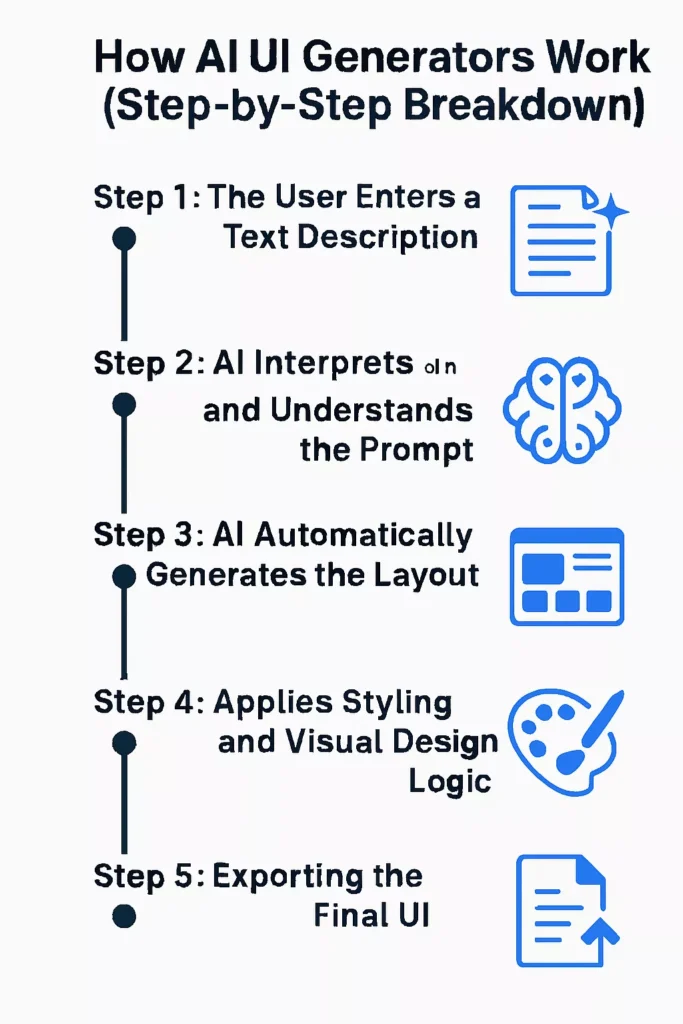
AI UI generators may be powered by advanced machine learning models, but the way they operate from a user’s perspective is incredibly simple. With just a plain text description, these tools can convert your ideas into complete, visually structured interfaces in seconds. Here’s a detailed look at how the process unfolds.
Step 1: The User Enters a Text Description
Everything begins with a natural language prompt.
The user simply explains what kind of interface they want—no technical terms, no design software, no coding required.
Example Prompt:
“Create an e-commerce homepage with a hero banner, product grid, search bar, and filters.”
This description can be short, detailed, or even conversational. The AI is built to interpret human language just like a designer would.
Step 2: AI Interprets and Understands the Prompt
Once the prompt is submitted, the AI uses Natural Language Processing (NLP) to deeply analyze the request. It breaks the description into actionable design elements and identifies:
- Which UI components the screen requires
- The structural hierarchy, such as headers, sections, and content blocks
- Functional intent, like search filters or product cards
- Stylistic hints, such as tone, mood, or brand personality
Behind the scenes, the model also refers to massive datasets of design patterns, component libraries, and best practices to interpret the prompt accurately.
Step 3: AI Automatically Generates the Layout
After understanding what needs to be built, the system begins arranging components into a logical layout. This step includes:
- Placing major sections (hero banner, product grid, sidebar, footer, etc.)
- Defining grid proportions for balanced visual spacing
- Aligning components so the design follows UX best practices
- Ensuring responsiveness, making the layout adaptable to mobile and desktop
The result is a clean, well-organized structure that feels professionally designed.
Step 4: AI Applies Styling and Visual Design Logic
Now the AI enhances the layout with visual style. This includes choosing and applying:
- Color palettes suitable for the theme or purpose
- Typography combinations for readability and aesthetic appeal
- Spacing and padding to ensure visual balance
- Icons and visual elements that match the interface’s content
Some AI UI generators allow you to specify a stylistic direction, such as:
- Minimal
- Modern
- Dark mode
- Corporate
- Playful
- Futuristic
Others automatically assign a style based on your prompt, brand information, or previous designs.
Step 5: Exporting the Final UI
Once the interface is generated and styled, users can export the final output in multiple formats depending on their workflow:
- Editable Figma files for designers
- React components for developers
- HTML/CSS/JavaScript for web integration
- Flutter widgets for mobile app development
- Low/high-fidelity wireframes for prototyping
This flexibility means the AI-generated UI can be used instantly—whether for mockups, production code, or rapid prototyping.
Why AI UI Generators Matter
AI-powered UI generators are transforming how products are designed, prototyped, and shipped. They compress long, iterative workflows into fast, repeatable steps, lower the barrier to entry for non-designers, and free teams to focus on higher‑value work like user experience and product strategy. Below are the key benefits explained in detail.
1. Unmatched Speed
What it delivers: dramatic time savings across the design and development lifecycle. AI UI generators convert ideas into visual interfaces in minutes rather than hours or days. This speed shortens feedback loops, lets teams try many variations quickly, and removes common bottlenecks that stall projects. Faster iterations mean problems are discovered and fixed earlier, reducing rework and accelerating time to market.
2. Instant Prototyping for MVPs
What it enables: rapid creation of realistic, testable prototypes. Startups and product teams can produce fully usable landing pages, dashboards, and app mockups in a fraction of the usual time. That makes it easy to build minimum viable products for investor pitches, early user testing, or internal validation without committing heavy engineering resources. The result is faster learning and more confident decisions about product direction.
3. No Design Skills Required
What it changes: accessibility of professional-looking interfaces. Anyone—founders, product managers, or junior team members—can describe a layout or feature in plain language and get a polished UI back. This democratization reduces dependency on scarce design talent for every small change and empowers cross-functional contributors to prototype and communicate ideas visually.
4. Reduced Development Cost
What it saves: time, money, and specialized resources. By automating routine design tasks and producing ready-to-export assets or code, AI tools let smaller teams accomplish more with fewer people. That lowers the cost of early-stage development and reduces the need for expensive, drawn-out design cycles, making experimentation and iteration financially feasible.
5. Consistent Design Systems
What it guarantees: visual and structural coherence across screens. AI enforces consistent spacing, color palettes, typography, and component hierarchy automatically. That consistency improves usability, reduces design debt, and simplifies handoffs to developers because the UI follows predictable rules. Teams spend less time policing style and more time refining functionality.
6. Faster Collaboration
What it simplifies: communication across roles and disciplines. Because AI tools accept plain-English prompts, product managers can describe requirements, designers can refine visual details, and developers can export production-ready code—all from the same starting point. This shared language reduces misunderstandings, shortens review cycles, and aligns stakeholders around concrete artifacts instead of abstract descriptions.
7. Supports Innovation
What it frees up: creative and strategic thinking. When AI handles repetitive, mechanical tasks, creators can concentrate on improving user experience, inventing novel features, and exploring bold design directions. That shift from execution to ideation encourages experimentation and helps teams deliver more distinctive, user-centered products.
Real-World Use Cases of AI UI Generators
AI UI generators are no longer experimental—they are actively reshaping how individuals, startups, and large organizations build digital products. From lowering design barriers to accelerating development cycles, these tools offer practical advantages across multiple industries. Below are the most impactful use cases where AI UI generation is making a real difference.
Use Case 1: Rapid MVP Development for Startups
For entrepreneurs and small teams, launching an MVP quickly can determine the success of a product. AI UI generators make this process dramatically easier by allowing non-designers and non-developers to create complete interfaces from simple text prompts.
With AI support, founders can rapidly build:
- Mobile app screens
- Landing pages for marketing campaigns
- Web dashboards for user testing
This speed enables startups to validate ideas, gather feedback, and pitch to investors without waiting for long design or development cycles. What once took weeks can now be accomplished in a single afternoon.
Use Case 2: Faster, Scalable Enterprise UI Workflows
Enterprises often manage multiple apps, dashboards, and tools across large teams—making UI standardization and scalability a major challenge. AI UI generators streamline these processes by helping companies:
- Build internal dashboards quickly
- Maintain consistent design systems across departments
- Accelerate front-end development through code-ready exports
With AI handling foundational design work, enterprise teams can focus on usability, security, and feature enhancements instead of repetitive interface tasks.
Use Case 3: Enhanced UX Ideation and Wireframing
Brainstorming and wireframing are essential early steps in UX design, but they can be time-consuming. AI UI generators empower product teams to explore numerous layout ideas instantly.
Instead of manually sketching or designing 20 variations of a single screen, AI can produce:
- Multiple wireframe options
- Different layout styles
- Alternative content structures
This rapid ideation supports faster decision-making, better creativity, and more effective design sprints.
Use Case 4: Coding Assistance for Front-End Developers
Many AI UI generators don’t just create visual layouts—they also export production-ready code. This is a massive advantage for developers who want to skip repetitive setup tasks.
AI-generated interfaces may include:
- React component structures
- HTML/CSS layouts
- Tailwind, Bootstrap, or Material UI markup
- Flutter or SwiftUI widgets
For developers, this means:
- Less boilerplate to write
- Faster project initialization
- Immediate visual confirmation of UI components
This allows engineering teams to focus more on business logic and functionality rather than layout crafting.
Use Case 5: Automatically Accessible UI Designs
Accessibility compliance is an essential part of modern software development, but it requires attention to detail and consistent review. AI UI generators help by automatically applying guidelines that support WCAG standards.
AI can adjust:
- Color contrast for readability
- Font sizes for visual clarity
- Layout spacing for tap targets
- Hierarchy for assistive technology compatibility
This helps teams build inclusive digital experiences without manually checking every accessibility rule.
Use Case 6: Education, Training, and Skill Development
AI UI tools are becoming valuable learning resources for students studying UI/UX design or front-end development. They offer a hands-on way to understand how professional interfaces are built.
Students can use AI to:
- Explore design patterns and how they work
- Generate sample projects and practice screens
- Analyze component structures and layout logic
- Learn modern UI frameworks through generated code
This accelerates learning and gives beginners confidence by showing them polished outputs from day one.
Key Technologies Behind AI UI Generators
A. Large Language Models (LLMs): Understanding and Interpreting Human Commands
At the core of every AI UI generator is a powerful language model such as GPT, Llama, or Gemini. These models are trained on vast datasets containing:
- UI design descriptions
- Component libraries
- Code structures
- UX patterns
LLMs analyze the user’s text prompt and determine:
- What components are needed (buttons, forms, cards, navbars, etc.)
- The purpose of the interface
- Content hierarchy and logical flow
- Styling keywords and layout expectations
This step transforms a simple sentence into a detailed design blueprint.
B. Diffusion Models for Intelligent Layout Generation
Once the AI understands what needs to be built, diffusion models help generate a visually coherent layout. Originally used for image generation, diffusion techniques are now adapted to:
- Arrange UI components intelligently
- Ensure visual balance and spacing
- Produce aesthetically pleasing compositions
They learn from thousands of high-quality designs to predict where each element should be placed to meet modern UI standards.
C. Computer Vision Models: Recognizing Patterns and Ensuring Design Quality
Computer vision allows AI UI generators to analyze and replicate professional design patterns by:
- Understanding common UI structures
- Recognizing alignment and symmetry
- Detecting spacing inconsistencies
- Learning from real interface examples
These models evaluate the design as a human designer would, ensuring the AI-generated layout looks intentional, functional, and visually polished.
D. Rule-Based and Constraint Engines: Maintaining Usability and Consistency
Behind every strong UI lies a set of rules—spacing rules, hierarchy rules, accessibility rules, and responsive behavior. AI generators use rule-based engines to enforce these design principles automatically.
They ensure:
- Consistent spacing between components
- Responsive grids that adapt to different screen sizes
- Accessible component sizes for touch, readability, and keyboard navigation
- Logical visual hierarchy for clarity
This combination of rules and constraints ensures that even AI-generated layouts stay aligned with professional UX standards.
E. Code Generation Models: Converting Designs Into Real, Usable Code
The final step involves transforming the AI-generated layout into actual front-end code. Specialized models translate the design into frameworks and languages such as:
- React (JSX components)
- Vue (template-based structures)
- Flutter (widget-based UI)
- SwiftUI (iOS declarative layout)
- Tailwind CSS (utility-first styling)
This means the output isn’t just a pretty mockup—it’s a functional foundation developers can immediately build upon.
F. Reinforcement Learning for UX Optimization
AI improves layouts by learning from:
- User behavior
- Industry standards
- A/B test insights
Popular AI UI Generator Tools — Market Overview
The AI UI tooling landscape is expanding quickly, but most offerings cluster into a few clear categories. Each category targets a different point in the UI/UX lifecycle, from early ideation to production-ready assets, and choosing the right class of tool depends on whether you need speed, fidelity, or developer-ready output.
Text-to-Figma Generators
- What they do: Convert natural-language prompts into editable Figma files and components.
- Why it matters: Designers and product teams can generate full screens, flows, and reusable components directly inside Figma, then refine or iterate without rebuilding layouts from scratch. This category shortens the loop between idea and visual mockup and preserves editability for designers who want fine-grained control.
Text-to-Frontend-Code Generators
- What they do: Produce working front-end code—React components, HTML/CSS templates, or Flutter layouts—directly from descriptions or designs.
- Why it matters: These tools bridge the design-to-development gap by delivering exportable, developer-friendly code, reducing manual translation work and speeding up implementation for engineers and small teams.
AI Wireframe Generators
- What they do: Generate low-fidelity sketches and layout blueprints for rapid ideation.
- Why it matters: Wireframe generators are ideal for early-stage exploration: they let teams test information architecture and user flows quickly, enabling faster decision-making before committing to visual design or engineering effort.
AI Component Builders
- What they do: Create discrete UI elements—buttons, cards, forms, tables, and dashboard widgets—based on short prompts.
- Why it matters: Component builders accelerate consistent UI construction and help enforce design system rules by producing standardized, reusable pieces that can be assembled into larger screens.
AI Website Builders
- What they do: Generate full websites, including page structure, content blocks, and sometimes hosting-ready output.
- Why it matters: For marketing sites, landing pages, and simple product sites, these tools can deliver end-to-end results quickly, reducing the need for separate design and development cycles.
Limitations of AI UI Generators (What They Still Can’t Do—Yet)
While AI UI generators offer impressive speed and automation, they are not without limitations. These tools excel at producing layouts and components quickly, but certain creative and strategic aspects of design still require human expertise. Below are the key limitations to understand when using AI for interface creation.
A. Not Always Pixel-Perfect or Artistically Refined
AI can generate functional and visually coherent designs, but it sometimes fails to capture the artistic nuance that experienced designers bring to a project.
Subtle details like:
- Micro-interactions
- Typography pairing
- Creative spacing
- Emotional tone
often require a human touch. AI focuses on patterns and logic, not artistic expression.
B. Complex UX Flows Still Depend on Human Strategy
AI generators are excellent at making individual screens, but designing an entire user journey—with all its decision points, emotions, and flow variations—still requires human insight.
For example, AI might create a perfect signup screen, but:
- Does it guide users effectively?
- Does it reduce friction?
- Is it aligned with business goals?
These bigger-picture questions are better answered by UX designers, researchers, and product strategists.
C. Over-Reliance on Learned Templates and Patterns
AI works by analyzing countless examples from existing design systems. As a result, it sometimes:
- Repeats familiar structures
- Plays it safe with conventional layouts
- Avoids bold or experimental ideas
This can lead to designs that feel generic unless a human adds creativity and customization.
D. Difficulty Maintaining Deep Branding Consistency
Although AI can match colors or approximate brand styles, it struggles to fully uphold a company’s identity system.
Human designers excel at:
- Expressing brand personality
- Maintaining visual storytelling
- Ensuring emotional resonance
- Creating unique, memorable identities
AI provides a foundation, but true branding still demands human creativity.
E. Requires Strong Prompting Skills for Best Results
The quality of the output often depends heavily on the clarity of the input.
A vague or incomplete prompt may lead to:
- Misaligned layouts
- Missing components
- Unintended styles
Users must learn prompt-writing skills to communicate effectively with the AI—similar to learning how to brief a human designer.
F. Code Quality Can Be Inconsistent
While some AI UI generators produce clean, modular code, others may generate:
- Overly complex structures
- Redundant classes
- Hard-to-maintain components
Developers sometimes need to refactor or rewrite parts of the output to meet production standards. AI can save time, but final responsibility for code quality still rests with humans.
The Future of AI UI Generators 2025–2032
AI-driven UI generation is still emerging, but the next seven years will bring step changes that reshape how products are conceived, built, and personalized. Expect tools to move from assistive helpers to proactive creators that handle routine work, surface insights, and enable teams to focus on strategy, experience, and differentiation.
I. Fully Autonomous UI Systems
AI will take responsibility for end-to-end interface creation, producing not just visuals but complete interaction blueprints.
What this looks like: AI will generate layouts, map user flows, define microinteractions, and run automated accessibility checks. Outputs will include annotated screens, interaction rules, and validation reports that meet WCAG standards. Human oversight will shift from crafting every pixel to setting goals, constraints, and brand guardrails while the system executes the details.
II. Real-Time UI Adaptation
Interfaces will become living systems that evolve continuously in response to data.
What this enables: UIs will adjust layouts, content prominence, and interaction patterns on the fly based on analytics, observed user behavior, and A/B test outcomes. The result will be interfaces that optimize themselves for engagement, retention, and task success without manual redesign cycles, while teams monitor and tune high-level objectives.
III. End-to-End App Creation
The pipeline from idea to production will compress dramatically.
What will happen: A single natural-language prompt will spawn a complete workflow: conceptual UI, componentized design, production-ready front-end code, integration scaffolding, and automated deployment. Developers will spend less time translating designs into code and more time integrating business logic, securing systems, and scaling infrastructure.
IV. AI Personalized UI for Each User
Personalization will move beyond content to the structure and behavior of interfaces.
How personalization will work: UIs will adapt to individual preferences, accessibility needs, cultural context, and device constraints. That means different users may see distinct layouts, navigation models, or interaction affordances tailored to their abilities and habits. Personalization engines will balance user privacy and consent while delivering more usable, relevant experiences.
V. AI UI Agents for Product Teams
Specialized AI agents will become embedded teammates that continuously improve product quality.
Agent capabilities: These agents will suggest UX improvements, detect friction points from session data, flag accessibility regressions, and propose experiments to boost conversion. They will synthesize qualitative and quantitative signals into prioritized recommendations, turning raw telemetry into actionable product workstreams.
VI. Zero-Code Enterprise App Builders
Enterprises will gain the ability to create internal tools instantly without engineering bottlenecks.
Business impact: Nontechnical teams will assemble dashboards, workflows, and integrations through conversational prompts and visual configuration. This will accelerate internal automation, reduce backlog for IT teams, and democratize tool creation while governance layers ensure security, compliance, and data integrity.
Will AI Replace Designers?
The simple answer is no – AI will not replace designers. Instead, it will elevate their work.
While AI UI generators are becoming incredibly powerful, they are designed to assist with technical and repetitive tasks, not replace the creative and strategic thinking that human designers bring.
What AI Does Well
AI excels at automating the time-consuming parts of design, such as:
- Repetitive UI component creation
- Generating layouts and screen variations
- Applying consistent styles and spacing
- Producing code-ready structures
These are tasks that benefit from speed, precision, and automation—areas where AI thrives.
What Designers Do Best
Human designers bring qualities that AI cannot replicate:
- Creativity — Crafting unique, original ideas that break patterns
- Branding — Translating identity, tone, and values into visual expression
- Experience strategy — Understanding user behavior, business goals, and emotional journeys
- Cultural and emotional relevance — Designing interfaces that resonate with real human experiences
These require intuition, empathy, storytelling, and innovation—skills AI cannot fully mimic.
The Future: Human + AI Collaboration
The design process is evolving into a partnership where:
- AI handles the groundwork (layouts, variations, coding)
- Designers focus on vision, strategy, and refinement
This collaboration allows designers to work faster, explore more ideas, and spend their time on higher-level creative decisions instead of repetitive manual tasks.
AI won’t replace designers. It will empower them to design smarter, faster, and more creatively than ever before.
Conclusion: AI UI Generators Are Redefining How We Build Interfaces
AI UI Generators represent a major shift in the world of design and development. By converting plain text into complete interfaces, they eliminate traditional bottlenecks and empower anyone to create professional UIs instantly.
Whether you’re a designer looking to speed up workflows, a developer aiming to reduce boilerplate, or an entrepreneur needing a fast prototype, AI UI generators offer unmatched efficiency, accessibility, and innovation.
As AI continues to evolve, the boundary between ideas and interfaces will become thinner—eventually allowing us to build entire digital products simply by describing them.