
Browser-based LLMs are AI models that run directly inside your browser without needing cloud servers, internet access, or external APIs. They use on-device processing through WebGPU, WebAssembly, and optimized model formats to deliver fast, private, and portable AI experiences. This makes them lightweight, secure, and ideal for everyday users who need instant, offline AI capabilities.
What Are Browser-Based LLMs?
Browser-based Large Language Models (LLMs) are compact AI models designed to run entirely inside a web browser. Instead of sending your data to the cloud—like ChatGPT, Gemini, or Claude—these lightweight versions process everything on your device using local hardware.
That means:
- No internet required
- No data sent to external servers
- No installation or complex setup
- Instant responses powered by your device’s GPU or CPU
Thanks to recent advances like WebGPU, WebAssembly (WASM), and optimized model formats such as GGUF, browser-based LLMs can now perform tasks that previously required high-end cloud systems.
Why Browser-Based LLMs Matter Today
The AI world is shifting toward privacy-first and resource-efficient computing. Browser-based LLMs are at the center of that shift because they let users run intelligent tools without depending on cloud companies.
They are becoming extremely important in:
- Privacy-sensitive industries
- Offline environments
- Low-resource countries
- Education systems
- Personal workflows
- Edge-AI and on-device automation
Browser LLMs = the new “AI apps” that work anywhere.
How Browser-Based LLMs Work
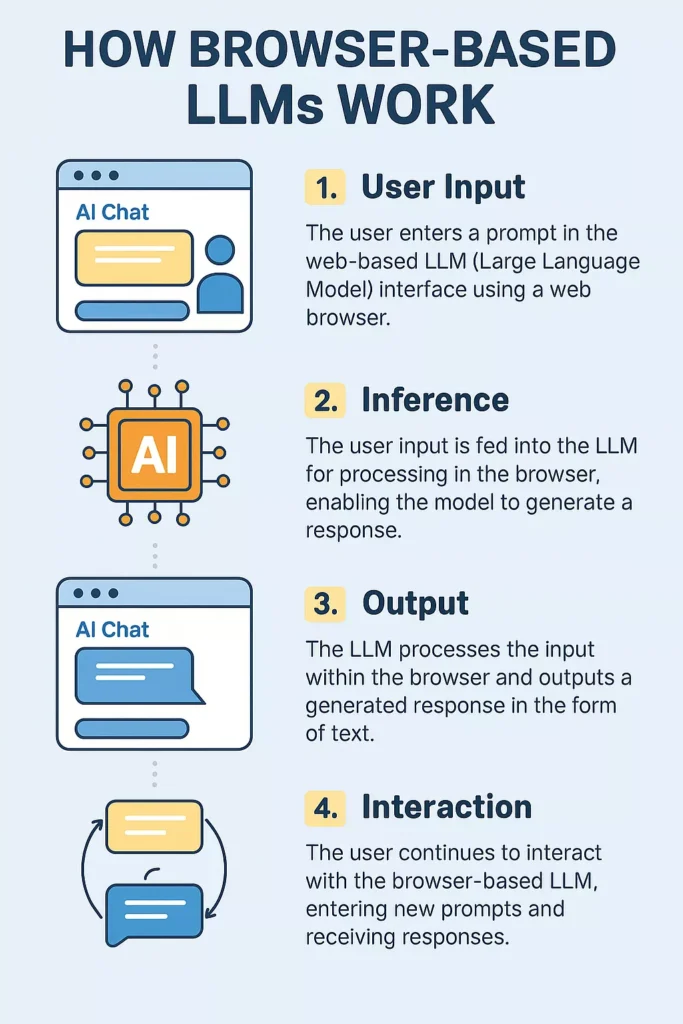
Browser-based LLMs rely on modern web technologies to run advanced AI models on consumer hardware.
1. WebGPU: The Secret Power
WebGPU lets browsers use your device’s graphics processor (GPU) for computation similar to how desktop AI tools like LM Studio work. It provides:
- Faster matrix operations
- Lower latency
- Ability to handle larger models
Most modern browsers support WebGPU including Chrome, Edge, Brave, and newer Firefox builds.
2. WebAssembly (WASM) for Efficiency
WASM compiles code into a compact binary that runs nearly as fast as native applications. AI frameworks use WASM to execute model logic directly in your browser.
3. Model Formats like GGUF
Models are specially converted into smaller formats such as:
- GGUF
- ONNX Runtime Web
- TensorFlow.js optimized models
These formats shrink model size and reduce memory usage.
4. Local Storage & Caching
Once the model loads in your browser, it can be cached locally:
- Runs instantly next time
- No repeated downloads
- Offline execution guaranteed
Benefits of Browser-Based LLMs
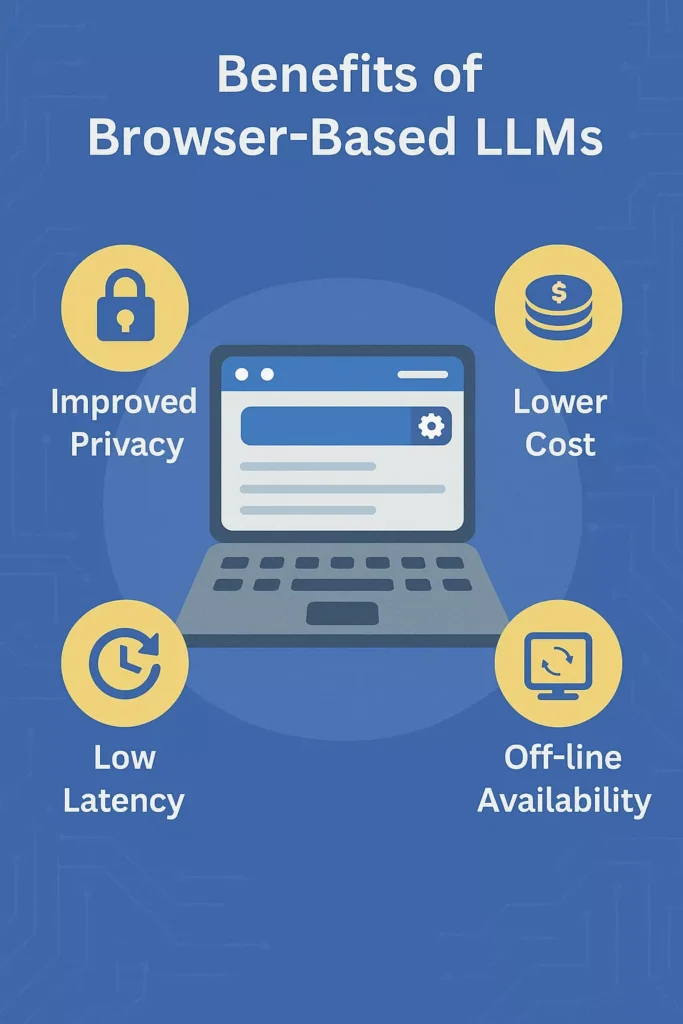
1. 100% Offline AI Processing
The biggest benefit—everything runs locally.
You can use:
- Chat
- Summarization
- Coding help
- Translation
- Text generation
…without internet access.
Great for travelers, remote workers, military, and rural areas.
2. Maximum Privacy and Security
Since no data is uploaded:
- Your conversations stay on your device
- No logs
- No server-side tracking
- No risk of data leaks
Perfect for lawyers, doctors, researchers, journalists, and companies with strict compliance needs.
3. No Cloud Costs, No API Fees
Browser-based AI is free after the model loads.
Businesses can avoid:
- API tokens
- Monthly subscriptions
- Hidden usage charges
- Infrastructure costs
This is one reason browser-based LLMs are growing rapidly.
4. Faster Response Time (Low Latency)
Because everything is processed locally:
- No server wait time
- No request throttling
- No network delay
On newer laptops with WebGPU, responses are almost instant.
5. Lightweight & Easy to Use
There is:
- No installation
- No complex environment
- No dependencies
Just open the browser → model loads → AI is ready.
This simplicity makes browser-based LLMs ideal for beginners and non-technical users.
6. Cross-Platform Compatibility
Browser-based LLMs work on:
- Windows
- macOS
- Linux
- Chromebooks
- Android (browser support improving)
- iPadOS
As long as you have a modern browser, the model works.
7. Great for Education & Learning
Students and teachers can use offline AI tools for:
- Writing
- Coding
- Language learning
- Homework help
- Research summaries
…without needing internet or exposing data to cloud AI services.
Popular Browser-Based LLM Tools
Below are browser-friendly LLM platforms that run fully offline:
1. WebLLM (By MLC AI) – The Most Advanced Browser AI Engine
WebLLM is widely recognized as the leading platform for running LLMs directly inside a browser. Powered by WebGPU, it brings near-native performance to lightweight models and is regularly updated to support popular architectures like Llama 3, Mistral, Gemma, Phi, and Qwen.
Why WebLLM Stands Out
- Uses WebGPU acceleration for very low latency.
- Supports quantized models (e.g., 4-bit, 8-bit) so they load quickly and run efficiently.
- Works seamlessly on Windows, macOS, Linux, and newer Chromebooks.
- Offers a clean chat interface plus developer-friendly APIs.
Best For
Developers, researchers, and power users who want the closest performance to desktop AI engines without installation.
2. Transformers.js – Hugging Face Models in Your Browser
Transformers.js brings the power of the Hugging Face ecosystem to JavaScript, allowing developers to run a wide range of LLMs—and even multimodal models—directly in-browser.
Key Advantages
- Very easy for developers to integrate into apps.
- Supports text generation, embeddings, sentiment analysis, image classification, and more.
- Uses WASM and WebGPU backends for fast inference.
- Thousands of pre-trained models available on Hugging Face Hub.
Best For
Frontend developers building AI-powered websites, apps, or educational tools.
3. ONNX Runtime Web – Enterprise-Grade Inference in the Browser
Microsoft’s ONNX Runtime Web supports high-performance LLM execution using either WebGPU, WebAssembly, or WebGL. It’s particularly popular among enterprises and companies who want reliable cross-platform inference.
Why Enterprises Choose It
- Highly optimized for performance and stability.
- Supports quantized models (INT8, FP16, Q4) for efficient browser use.
- Can run both LLMs and vision models offline.
- Strong support and documentation from Microsoft.
Best For
Large enterprises and developers creating commercial-grade offline AI applications.
4. GPT4All Web & WebGPT Ports – Simple, Clean, and Offline
GPT4All, originally a desktop app, now inspires browser-based ports that replicate its functionality online. These versions load compact models and store them locally for offline use.
Top Features
- Extremely user-friendly interface.
- Supports small but fast models (1B–3B range).
- Runs entirely inside browser storage after initial download.
- Perfect for general-purpose text generation.
Best For
Beginners, casual users, educators, and people who want ChatGPT-like functionality without the cloud.
5. Ollama-Inspired Web Projects – Local AI, No Install
Ollama itself is desktop-based — but in 2025, many community web ports replicate its experience in-browser. These tools allow you to load GGUF models and interact with them in a familiar chat UI.
Highlights
- Clean interface similar to Ollama desktop.
- Accepts locally hosted GGUF models for full offline use.
- Great for quick prototyping and testing.
Best For
Users who love the Ollama experience but prefer running everything inside a browser tab.
6. LiteLLM Web & Local Playground Tools – Fast Local Testing
Multiple “playground-style” browser tools appeared in 2024–2025 that allow quick access to local models without configurations.
Examples include:
- LiteLLM Web UIs
- Local GGUF playgrounds
- WebGPU inference demos
Why These Tools Are Growing
- No installation or environment setup.
- Ideal for testing model behavior.
- Allows instant experimentation with different quantizations and sizes.
Best For
Students, researchers, and rapid AI prototyping.
7. Moondream Web Clients – Image + Text AI Inside Browser
Models like Moondream, known for high performance in small sizes (1B–2B parameters), run extremely well in browsers. Moondream’s web clients allow multimodal interactions fully offline.
Standout Capabilities
- Image understanding (describing images, OCR).
- Fast text generation.
- Very small model sizes with impressive accuracy.
- Great for creatives and multimedia workflows.
Best For
Designers, students, and casual users who need simple multimodal AI offline.
8. Web-StableLM, WebPhi, and WebQwen – Optimized Next-Gen Models
Many new mini-models such as StableLM 3B, Phi-3 Mini, and Qwen 1.5B/2B now have browser-optimized versions.
Their Strengths
- Extremely small but high-quality.
- Load very fast (5–15 seconds).
- Ideal for generating ideas, summaries, and explanations.
- Great for mobile browsers too.
Best For
Performance on lower-end hardware, including Chromebooks and older laptops.
Popular Browser LLMs Compared
| Tool | Primary Strength | Best For | Offline? |
|---|---|---|---|
| WebLLM | Fastest WebGPU performance | Developers, researchers | Yes |
| Transformers.js | Huge model variety | Frontend developers | Yes |
| ONNX Runtime Web | Enterprise-grade reliability | Companies, production apps | Yes |
| GPT4All Web Ports | Simple & beginner-friendly | General users | Yes |
| Ollama Web Projects | Familiar Ollama-style UI | Local model lovers | Yes |
| LiteLLM Web Playgrounds | Quick demos & testing | Students, hobbyists | Yes |
| Moondream Web | Multimodal offline | Creatives | Yes |
| WebStableLM / WebPhi | Small but powerful | Low-end devices | Yes |
Who Should Use Browser-Based LLMs?
Browser-based LLMs are becoming useful across many industries and user groups. Here is a structured A–D breakdown with detailed, engaging explanations.
A. Privacy-Focused Professionals
These users handle highly sensitive information and need AI tools that keep all data on the device.
Ideal For:
- Lawyers – Draft contracts, summarize legal text, and analyze documents without client data leaving the device.
- Psychologists – Take therapy session notes or generate reports with full confidentiality.
- Healthcare Professionals – Summarize medical notes, clinical records, or patient histories privately.
- Journalists – Process interviews, write articles, and analyze sensitive sources securely.
- Corporate Teams – Handle internal documents without fear of leaks or external monitoring.
Why This Group Benefits
- All text is processed locally with zero cloud transfer.
- Perfect for industries with strict compliance, like HIPAA or GDPR.
- Reduces risk of unauthorized access, data breaches, or third-party tracking.
B. Students & Educators
Educational environments benefit heavily from offline, accessible AI.
Ideal For:
- Classroom teaching assistants
- Students doing research or writing
- Tutors and academic facilitators
Why This Group Benefits
- Works fully offline, perfect for classrooms without reliable internet.
- No exposure of student data to external AI services.
- Helps with:
- Homework explanations
- Research summaries
- Note-taking
- Essay drafting
- Language learning
- Reliable, safe, and cost-free compared to cloud-based AI tools.
C. Developers & AI Researchers
Technical users love browser-based LLMs for fast experimentation and lightweight testing.
Ideal For:
- Web developers building AI-powered apps
- ML engineers testing optimized quantized models
- Researchers evaluating model behavior
- Prototype builders and hobbyists
Why This Group Benefits
- Run small or medium LLMs without a dedicated GPU machine.
- Perfect for testing new model architectures quickly.
- Allows:
- Comparing quantization methods
- Evaluating latency
- Running edge-AI demos
- Experimenting with custom UIs
- No installation, no environment setup—just open a browser and start testing.
D. Remote Workers, Travelers & Cost-Sensitive Businesses
People and companies who want AI that works anywhere and saves money.
1. Remote Workers & Travelers
Why They Benefit
- AI works in planes, mountains, rural areas, and no-network zones.
- Perfect for digital nomads who need research, writing, and task assistance on the go.
- No dependency on slow, unstable, or expensive internet.
2. Businesses Wanting Low-Cost, Scalable AI
Why They Benefit
- Cutting cloud API usage dramatically reduces monthly expenses.
- No server hosting, GPU infrastructure, or cloud billing required.
- Ideal for startups and SMEs that need AI but have limited budgets.
- Useful for secure internal workflows where data must stay on company devices.
Use Cases of Browser-Based LLMs
Browser-based LLMs are incredibly versatile, offering powerful offline intelligence for personal, educational, and professional tasks. Because they run entirely on-device, they provide speed, privacy, and convenience in many real-world workflows.
A. AI Chat & Content Generation
Browser-based LLMs make everyday writing tasks faster and easier — all without an internet connection.
They can help with:
- Writing blog posts, articles, and social content
- Rewriting or polishing text
- Brainstorming new ideas
- Drafting emails and messages
- Explaining concepts in simple language
Because everything runs locally, these tasks remain fully private and accessible anywhere.
B. Code Assistance & Debugging
Browser LLMs act as lightweight coding companions directly inside your browser environment.
They are useful for:
- Suggesting code snippets
- Refactoring or rewriting functions
- Debugging scripts and explaining errors
- Assisting with frontend development through browser dev tools
They provide quick, offline help to developers working on the go or testing prototypes.
C. Summarization & Note-Taking
Browser-based LLMs can analyze and condense documents without uploading them online.
Ideal for:
- Students reviewing study materials
- Lecturers preparing teaching notes
- Business analysts summarizing reports
You can load PDFs, copy text, or upload content for instant offline summarization.
D. Translation & Language Support
Because browser LLMs process text locally, they can translate between languages without needing internet access.
Benefits include:
- Faster translation
- No exposure of sensitive content
- Useful for travelers, writers, and multilingual teams
This makes offline translation one of the most practical use cases.
E. Customer Support Simulations
Companies can use browser-based LLMs for internal training and scenario practice.
Useful for:
- Customer support agents
- Sales teams
- Onboarding and soft-skills training
Since these simulations run offline, they can be used anywhere without network restrictions.
F. AI for Secure Enterprises
Organizations with strict data protection requirements benefit greatly from browser LLMs.
Why enterprises use them:
- Data never leaves the device, ensuring complete confidentiality
- No external servers or APIs means fewer compliance risks
- Easy deployment on hundreds or thousands of company computers
- Lower costs since there are no cloud usage fees
This makes browser-based LLMs perfect for industries like healthcare, finance, government, and legal sectors.
Limitations of Browser-Based LLMs
Browser-based LLMs offer impressive capabilities, but like any emerging technology, they come with certain constraints. Understanding these limitations helps set realistic expectations and clarifies where cloud-based models still dominate.
I. Smaller Model Size
Browser LLMs typically range between 1B and 3B parameters due to memory and performance limits.
While these models are efficient, they cannot match the reasoning power or depth of cloud giants like GPT-5, Claude, or Gemini Ultra.
II. Hardware Dependent
Performance varies significantly based on your device.
- Modern laptops with strong GPUs run models smoothly.
- Older or low-end machines may experience slower responses or reduced accuracy.
Your browser basically becomes the “AI engine,” so better hardware delivers better results.
III. Memory Restrictions
Browsers impose memory caps to ensure stability, which limits how large a model can be loaded.
This prevents extremely large LLMs from running locally and restricts advanced functionalities that require large memory footprints.
IV. Limited Context Window
Cloud models now support 200k to 2 million tokens of context.
In comparison, browser-based LLMs offer much smaller context windows, reducing their ability to handle very long documents or multi-step reasoning spanning thousands of lines.
V. Not Ideal for Heavy Reasoning or Multimodal Tasks
While great for lightweight tasks, browser LLMs still struggle with:
- Deep reasoning
- Complex coding agents
- Advanced decision workflows
- Heavy multimodal input (like combined vision + audio models)
Cloud AI remains stronger for these demanding use cases.
Future of Browser-Based LLMs
Despite current limitations, browser-based LLMs are rapidly evolving and are considered one of the most transformative trends in AI. They align perfectly with the future of computing: private, decentralized, and device-first.
1. More Powerful On-Device Models
We can expect 5B–10B parameter models running smoothly inside browsers thanks to:
- Smarter quantization
- Faster WebGPU
- Improved WASM efficiencies
These models will dramatically narrow the gap between local and cloud AI.
2. Fully Multimodal Browser Intelligence
Future browser-based LLMs will process multiple input types entirely offline, including:
- Images
- Audio
- Speech
- Real-time webcam feeds
This will turn browsers into powerful multimodal AI hubs.
3. Personal AI Agents Inside Browsers
Lightweight browser agents will soon be able to:
- Automate daily digital tasks
- Read and analyze webpages
- Fill forms intelligently
- Summarize documents instantly
- Deliver personalized suggestions
All without relying on cloud servers.
4. Stronger Privacy-First AI Ecosystems
Global regulations like GDPR, DMA, and enterprise security standards will push more organizations toward on-device AI to minimize risk, reduce compliance overhead, and maintain data sovereignty.
5. Faster WebGPU Advancements
As GPUs improve and WebGPU becomes more optimized, browsers will be able to process larger models at near-native desktop speeds.
This will unlock a new era of seamless offline AI experiences.
Conclusion
Browser-based LLMs are transforming how people use AI—by making it offline, private, lightweight, and device-powered. They eliminate cloud dependency while offering impressive speed and flexibility. For students, professionals, developers, enterprises, and educators, they open a new era of accessible and secure AI tools.
As the technology evolves, we can expect browser LLMs to become smarter, more multimodal, and more integrated into daily workflows – shaping the future of AI-powered productivity.